
Which AI model should write our docs? We tested it
When introducing AI into a content production workflow, evaluations typically centre around which model or agent to use. We went a step further, and tested what difference the choice of model used for each step in the workflow makes to the overall quality and efficiency.

When companies and teams are looking at introducing AI to their content supply chain, the discussion typically centres around which model or agent to use. This may just be evaluating the agent that is bundled within an existing tool, such as Salesforce or Copilot, or the latest model released.
Whichever model is being evaluated, the focus is usually on how well the model writes. However, an effective authoring workflow has several distinct steps: Planning, authoring and reviewing. In an automated pipeline, each of these steps can use a different model.
To better understand how to build an efficient AI-enabled authoring workflow, we wanted to know what difference the choice of model used in a particular step makes to the overall quality and efficiency of the process.
The planning step has the biggest impact
- Planning moves quality most
A stronger planner raised the score by 16 points, and a weaker one lowered it by 15. - The reviewer barely changes it
With any of the three models as reviewer, task orientation stayed within four points of the baseline. A stronger reviewer mostly added cost with little improvement to quality. - The planner decides reliability
Nearly every run that failed did so during the planning step. With Gemma 4 31B as the planner, 6 of 10 attempts failed. - Model choice alone isn’t enough
The source input and context that the authoring agent has to work with matters as much as the model choice.
The authoring workflow
To produce a finished document, an authoring workflow takes the source input and processes it through the following steps:
- Planning
Define who the readers are, the structure and scope of the guide, and the content for each topic. - Authoring
Create the content for each topic in the plan, and make any revisions that the review asks for. - Reviewing
Check the plan and the topics created, and send findings back for repair.
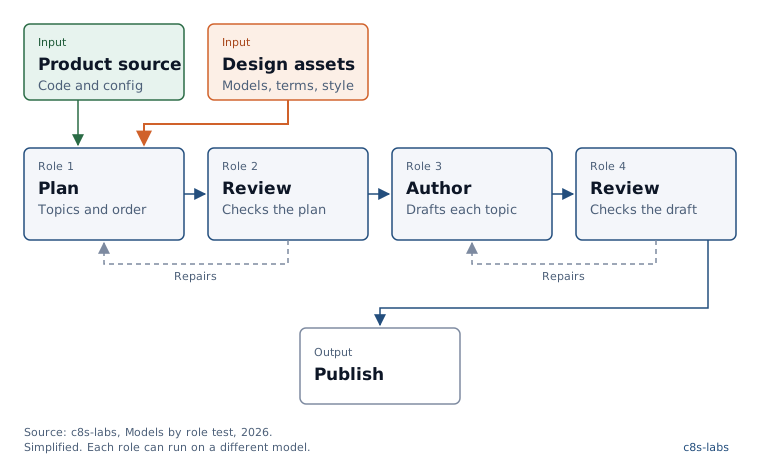
Plan includes audience profiles, taxonomy discovery, the content plan and the topic specifications. Review is the workflow’s own check. It’s separate from the judges described below.
The test
We used an author agent to produce a user guide for two open-source applications. We ran the same pipeline multiple times, changing only the model in one role per run.
The author agent
Every run used c8s-labs’ Dai Bach with the same configuration for every run; only the models under test changed between runs.The output
The agent planned and wrote a software user guide as Markdown files. The files were compiled into a documentation site using Blume.The source input
The code bases of two open-source applications: Kimai, a time tracking app, and Paperless-ngx, a document management system.
c8s-labs’ Content Ops Director provided the same set of information design assets: a document model, content types, audience profiles, terminology and a style guide.The models
Every model was called through OpenRouter, so only the model selected changed between runs. The swapped-in models covered three categories:- Top end: GPT-5.6 Sol
- Mid-range: Gemini 2.5 Flash
- Open weight: gpt-oss-120b and Gemma 4 31B.
Gemini 2.5 Flash was used as the baseline in every role. For each test run, the model used in one role was swapped, and the other two roles used Gemini.
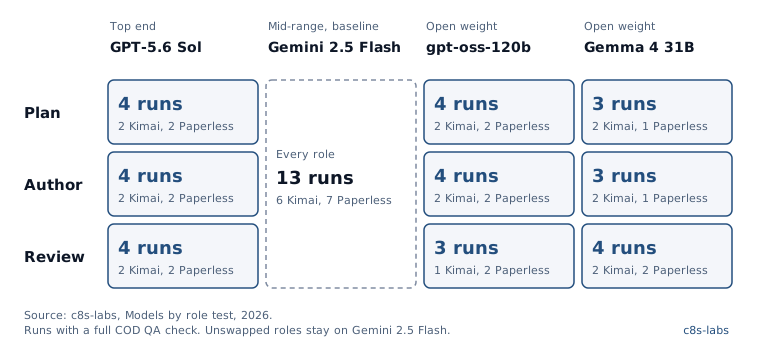
The judges
To assess the quality of the user guides produced during the test, every complete build of the user guides was judged in the following ways:
- Conformance to the information design assets
The QA module of Content Ops Director (COD) checked each guide against the design assets used, for structure and for style. - Content quality
Two LLM judges, Claude Opus 5 and Grok 4.6, scored each guide blind, without knowing which configuration produced it. They scored against the eight categories of IBM’s characteristics of quality technical information, from task orientation to retrievability. The two judges agreed well overall (kappa 0.73).
The results
For production, the strongest pattern is a top-end planner with a cheaper author and reviewer. With GPT-5.6 Sol planning and Gemini 2.5 Flash writing and reviewing, task orientation rose from 62 to 78. Token use per run fell from 2.8 million to 1.6 million, and the median run took 7 minutes, the fastest of any configuration. None of its four attempts failed.
Paying for a top-end model in the planning step bought the most quality. As author it added 7 points but made runs slower, and as reviewer it added tokens and time with no gain in quality.
Whichever models you choose, they can only work with what you give them. Every run here had the same source input and the same information design assets. Our information design asset tests show how much those assets shape the result.
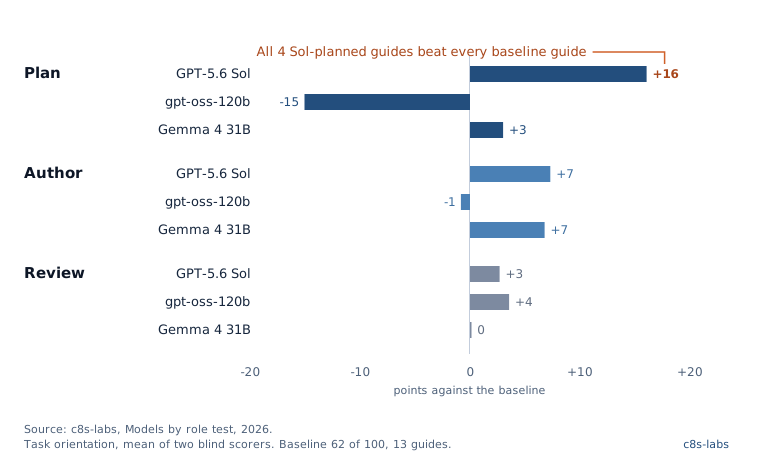
Task orientation, the mean of the two judges’ scores. Change in points against the baseline (13 guides). Each configuration has 3 or 4 guides. The average across all eight categories shows the same order: Sol planning +5, gpt-oss-120b planning −8, and no reviewer more than 3 points from the baseline.
Top end: GPT-5.6 Sol
- As planner
It was the strongest result in the test: +16 task orientation, the fewest tokens per topic and the fastest runs. - As author
+7 task orientation at about the baseline token use, but slower, with a median of 14 minutes against 8. - As reviewer
No gain in quality, and the highest cost. It raised 2.7 times as many findings and asked for 11 times as many repairs (124 a run against 11), which pushed token use to 5.0 million a run, 1.8 times the baseline.
Mid-range: Gemini 2.5 Flash (baseline)
- In every role
A dependable all-rounder: 2.8 million tokens and 8 minutes a run, with 3 failed attempts out of 21. - As planner
Gemini used the most tokens of any planner. Replacing it with any of the other planners cut a run to about 1.5 million tokens. - As reviewer
As good as any reviewer we tested, for the fewest repairs. It’s the economical choice for this step.
Open weight: gpt-oss-120b and Gemma 4 31B
- As planner
These were the least reliable. gpt-oss-120b lowered task orientation by 15 and made small guides of 36 pages, against 61 for the baseline. Gemma 4 31B landed close to the baseline (+3), but 6 of its 10 attempts failed. - As author
This was the most promising role for open weight. Gemma 4 31B added 7 points of task orientation. gpt-oss-120b left task orientation flat, wrote more concrete text (+11), and scored lower on style (−8) and on matching the product’s behaviour (−9). Both were slower, with medians of 17 and 32 minutes. - As reviewer
No difference in quality (within 4 points), at about the baseline token use.
Conformance
Conformance stayed high across every model: structure scored between 92 and 99, and style between 91 and 94. It can still hide a weak plan. The small gpt-oss-120b guides scored slightly higher on structure (96.8 against 95.6), because a guide with fewer topics has fewer places to break the rules.
Coverage
A stronger planner didn’t always cover more of the product. Each guide was checked against a list of items taken from the source input: 70 for Kimai and 50 for Paperless-ngx.
The Sol-planned guides were shorter on average - 43 pages, against 61 for the baseline. Sol made tighter plans that scored better for task orientation.
Time and tokens
Gemini 2.5 Flash used the most tokens - about 2.8 million a run against 1.5 million.
Sol was the fastest planner with a median of 7 minutes, but as a reviewer it was the most expensive - about 5.0 million tokens a run, 1.8 times Gemini 2.5 Flash. Most of the increase was caused by the number of repairs that the reviewer asked for.
gpt-oss-120b was the slowest model, with medians of 27 minutes as planner and 32 as author.
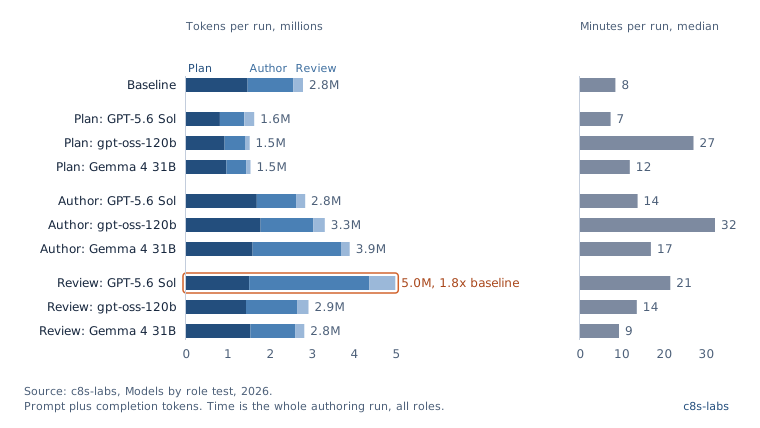
Prompt plus completion tokens per finished run, by role. Time is the median for the whole authoring run, all roles together. The pipeline doesn’t record time per role. Finished runs: 4 to 18 per configuration.
What the test does and doesn’t show
- Samples are small
There were only three or four judged runs per configuration. Large effects, such as the planner’s, stand out. Small differences, such as the gap between reviewers is less certain. - Only one model temperature
The impact of modifying the model temperature was not tested. Sol ran at the provider’s default temperature, and the other models at 0.1. - Provider routing
OpenRouter chose which provider served each call which led to variations across runs. For example, in one Gemma 4 31B writing run, one serving provider returned empty answers 419 times, and the run dropped 37 of its 83 planned topics. The gpt-oss-120b runs were served by 10 to 15 providers. We would want to control for this variance in future tests.
What this means
If you are looking at how to introduce AI into your content supply chain, there is more to consider than just which model to use.
Setting up a workflow that leverages the strengths of different models for each role can deliver greater efficiency and quality than using the “best” model for all roles. An effective planner determines the coverage and structure, which can make downstream savings. However, a capable planner is only as good as the source input and design assets that it has to work with.
If you’re looking at how to introduce AI into your content supply chain, which model to use is only part of the question.
- research
- ai
- ai-authoring
- llm
- information-design